How to Cancel Reading Eggs in 2026?
reviewed by Jessica Kaminski
Updated on August 26, 2026
Key points
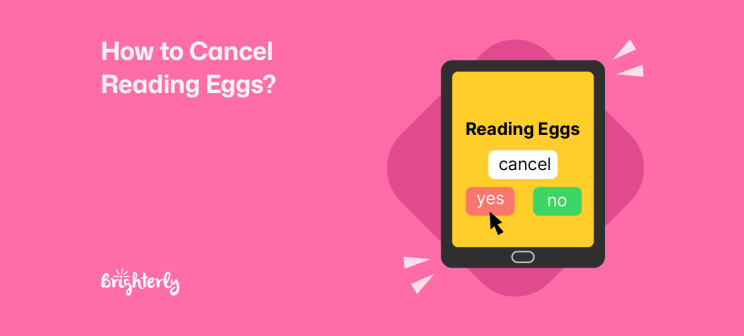
- You can cancel your Reading Eggs subscription from the site’s web version only and no later than 24 hours before your next billing date.
- Many parents have chosen to cancel Reading Eggs because its learning is considered superficial and may not improve kids’ knowledge
- The steps you need to take to cancel your Reading Eggs subscription differ based on where you purchased it: purchases through the website, Apple App Store, or Google Play Store
- Parents don’t need to speak to the Reading Eggs customer service team to cancel their subscription.
Exploring alternatives?

Can You Cancel Reading Eggs Subscription?
You can cancel your Reading Eggs subscription anytime through your online account. However, the method you must use varies depending on whether you got the app through the company website, the Apple App Store, or the Google Play Store.
The platform has monthly and annual subscriptions, but it doesn’t offer temporary pauses with the ability to reactivate your account later. Once you cancel, you can continue using it for the period for which you have paid the Reading Eggs cost, after which time you lose access. You won’t be charged anymore from the final date in that period.
Explore Brighterly Learning Experience
Learn exactly how Brighterly helps students thrive through expert sessions, online tools, and proven feedback from thousands of satisfied parents
How To Cancel Reading Eggs Subscription?
- Open the app on your computer browser (this has to be done from the website, not the app).
- Log in to your parent dashboard.
- Go to “My Account”.
- Select “Manage Subscriptions” from the menu.
- Click “Cancel”.
Reading Eggs Cancel Subscription: How To Do It Step By Step
Open The App On Your Computer Browser
The first step in how to unsubscribe from Reading Eggs is to open the platform through a browser using a computer, laptop, or mobile device. This cannot be done through the app directly.
Switch to Reading Help You Control
Brighterly has no long contracts — pause or cancel your reading plan anytime 
Log In To Your Parent Dashboard
Next, you need to sign in to your parent dashboard. For this purpose, you have to enter the email and password you used when creating your Reading Eggs account. Make sure you remember them or write them down to be able to opt for Reading Eggs cancel subscription whenever you deem necessary.
Go To “My Account”
The third step is to click the “My Account” tab located in the upper right-hand corner of the screen. This opens a menu with a few options.
Select “Manage Subscriptions” From The Menu
From the drop-down menu, click “Manage My Subscriptions,” which is the first available option.
Click “Cancel”
Once you have opened your subscriptions, click the “Cancel” button next to the subscription you want to stop using. It’s very important to note that you need to confirm your decision to cancel Reading Eggs to complete the process — clicking the cancel button once is not enough.
Note: Once you subscribe to Reading Eggs, you will continue to be charged monthly or annually — in line with your selected plan — until you go and actually cancel. Once you’ve gone through the steps of canceling your Reading Eggs subscription, you can continue using the app for the rest of the duration of the paid period. After this period is over, you lose access.
Reading Eggs Cancel Subscription From The Apple App Store Or The Google Play Store
To cancel a Reading Eggs subscription, it’s first important to find out where you purchased Reading Eggs, whether through the website or one of these app stores.
How To Cancel Reading Eggs From The Apple App Store Step By Step
- Open the “Settings” app on your iPhone
- Choose your name
- Tap “Subscriptions”
- Choose the Reading Eggs subscription
- Tap “Cancel Subscription”
- Confirm your cancellation
How To Unsubscribe from Reading Eggs Purchased From The Google Play Store
- Open the Google Play Store app on your Android mobile or tablet
- Tap on your profile icon
- Choose “Payments & subscriptions”
- Select “Subscriptions”
- Tap the Reading Eggs subscription
- Tap “Cancel subscription”
- Continue with the steps that the app prompts to finalize the process
Reading Eggs Customer Service Role In Cancellations
Unlike other reading websites for kids, opting out doesn’t involve Reading Eggs customer service. Even if you’ve been using the app, you have the ability to log onto the website in a browser and cancel that way, or cancel via your app store.
How To Delete Reading Eggs Account?
You can delete your Reading Eggs account both from the app and the website. The procedure is similar, but there are some differences, so I’ll take you through both processes.
To completely delete your Reading Eggs account for good from the app, follow these steps:
- Enter your Reading Eggs account via the app on your device
- Select “My Account” from the “Menu” in the upper left-hand corner
- Click on “Edit My Account”
- Tap “Delete my account” under the “Security” sectionTick the two checkboxes that appear
- Confirm by pressing “Delete Account”
Meanwhile, you can delete your account from the website using a web browser by going through the following steps:
- Sign in to your Reading Eggs account through the website using your email and password
- Click “My Account” in the upper right-hand corner
- Choose “Edit My Account” from the drop-down menu
- Click “Delete my account” under “Security”
- Tick the checkboxes
- Click “Delete Account”
Note: Deleting your Reading Eggs account is permanent, and you cannot retrieve an account that’s been deleted. You’ll lose all data associated with your account, including your child’s learning progress, and you won’t be able to recover it.
How To Cancel Reading Eggs Free Trial?
- Log in to the “Family Dashboard” through the website — you cannot do this through the Reading Eggs app
- Go to “My Account”
- Click “Manage My Subscriptions”
- Choose “Cancel”
If you got the free trial of Reading Eggs from Apple/Google, you have to go to the respective app store and cancel from there.
Try Reading Tutoring With No Strings
Brighterly offers a free first reading lesson — see if 1:1 tutoring fits your child
What Is The Reading Eggs Refund Policy?
Under the Reading Eggs refund policy, the app offers a 30-day money-back guarantee to parents who purchased a paid subscription through the website.
To get a Reading Eggs cancel subscription refund within these first 30 days, you need to send an email to Reading Eggs customer service, including:
- Your name
- Address
- Phone number
- Email address
- Subscription for refund
- Date of purchase
- Reason for refund
After the end of the 30-day period, you cannot get a Reading Eggs refund.
Note: These instructions apply to purchases made through the Reading Eggs website or the Google Play Store. In order to request a refund from a Reading Eggs subscription purchased through the Apple App Store, you’ll need to go through Apple.
Reasons To Cancel Reading Eggs App Subscription
The reasons to cancel Reading Eggs app subscription include a lack of solidified learning, content that becomes less engaging over time, and a confusing way of assigning content based on your child’s reading level, according to user reviews.
Reading Eggs Reviews
Reading Eggs has a Trustpilot rating of 2.5 (as of August 2026, based on 25 reviews), which suggests parents have mixed experiences. Some praise the platform, while others highlight its potential downsides. Let’s take a look at some of the key factors parents highlight in their reviews of Reading Eggs:
Lack Of Educational Attainments
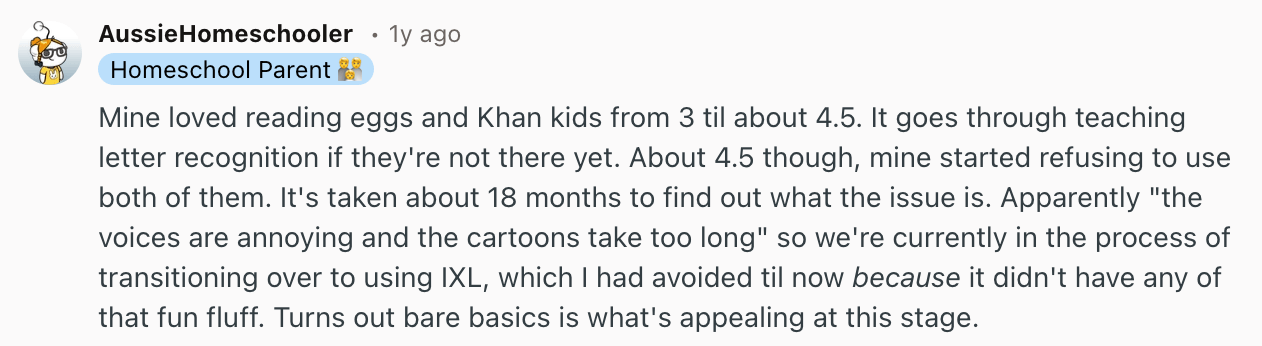
Some users say that Reading Eggs didn’t impart much knowledge on their children, with this parent labelling it “simply edutainment” on Reddit (as of March 2025). They note that the lessons didn’t come across as genuinely educational and said they were required to teach their children the content manually.
Content And Delivery Not Fit For The Target Age Group
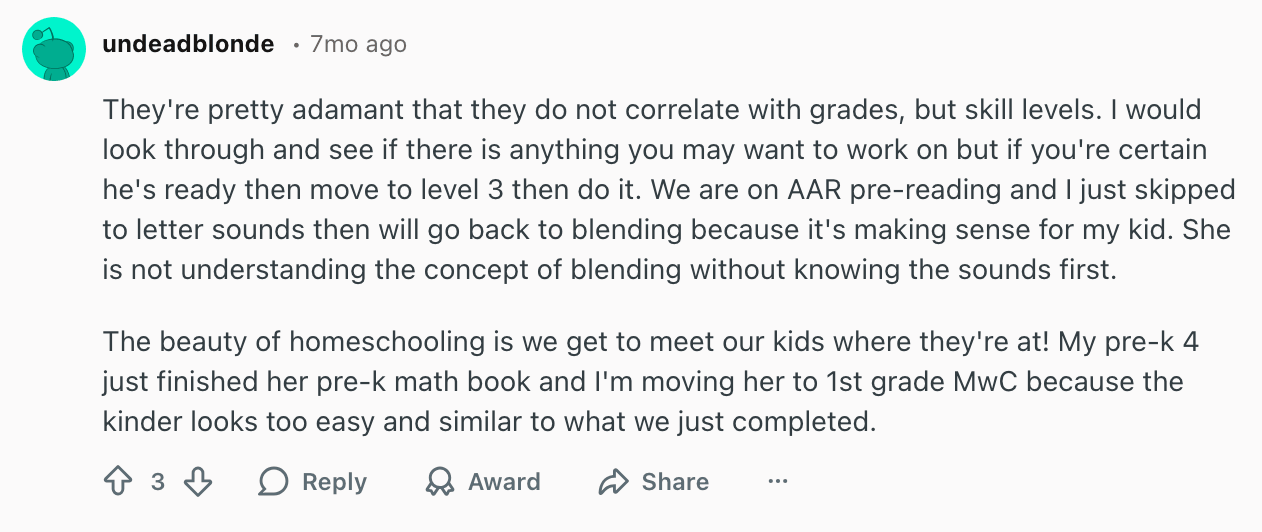
As shown by this Reddit review (as of August 2025), Reading Eggs works on skill levels, which can be confusing for parents who aren’t sure what content or delivery style is appropriate for their children. This means that finding the right level can be difficult, which may result in wasted time. However, once parents get the hang of the system, they’ll be able to find appropriate learning materials for their child.
Boring Learning Materials And Interface
Reading Eggs uses gamified learning, which is a proven way to engage children in reading and improve their knowledge, according to a 2024 LEARN Journal study.
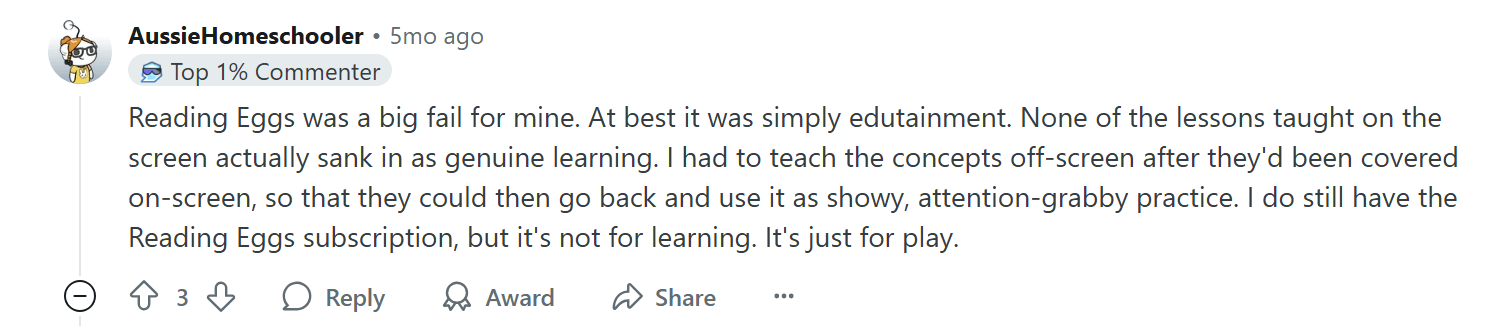
This parent highlighted on Reddit (as of March 2025) that, while the platform was highly effective for their child for a period of time, it started to get boring. This suggests that the content can only take children so far before it becomes less engaging. It also highlights the importance of monitoring your child’s screen time.
When Reading Eggs Is Not Enough
Since you’ve made a decision to cancel Reading Eggs, you may be actively searching for better reading apps for your child. Here, we’re going to cover Reading Eggs alternatives that are most commonly recommended by other parents: Brighterly, ABCmouse, and Starfall.
| Reading Eggs | Brighterly | ABCmouse | Starfall | |
| Company type | A learn-to-read program that uses reading games and books |
A personalized one-to-one online learning platform offering online |
An online curriculum with a ticket and rewards system | Online learning platform designed for children with additional learning needs |
| Subjects | Reading and phonics, with a focus on letter sounds and reading comprehension | Math and reading | Reading, math, art, music, social studies, and science | Math, language arts, and music |
| Learning model | Online and app-based games supported by books | Personalized one-to-one tutoring supported by free reading worksheets |
Online games, videos, and virtual worlds | Self-paced learning with online games and movies, plus books |
| Free trial? | Yes | Yes, in the form of a free lesson | Yes, for ABCmouse classic | Yes |
| Personalized learning? | Yes | Yes | Yes | Yes |
Brighterly
The Brighterly educational platform offers 1:1, customized online tutoring in real time. Our award-winning curriculum matches nationwide standards while dynamically adjusting to the evolving needs of students.
Highly qualified reading tutors deliver personalized education with a focus on boosting confidence. They make lessons entertaining to help kids learn each time and plant in them the seeds of love for education. Check out parent reviews to see the evidence!
ABCmouse
Some parents choose ABCmouse over Reading Eggs for the wider spectrum of academic subjects and the more affordable annual cost. ABCmouse reviews show that it is comparable to Reading Eggs in terms of teaching methodology and features. ABCmouse focuses on sight words, phonemic awareness, and letter and sound recognition. It offers video lessons, books, games, puzzles, and songs.
Starfall
Another alternative to Reading Eggs recommended by parents is Starfall, which covers ELA and math. Similar to Reading Eggs, the self-paced Starfall uses gamification for teaching and exercising.
Another important benefit of Starfall is that it was designed with the needs of students with learning disabilities in mind. In terms of reading, it focuses on phonics.
Other top reading platforms for kids
After you cancel Reading Eggs, you need to find a new resource to supplement your kid’s learning at school. Here are a few articles that present and compare popular options that can guide your choice:
- Reading Eggs vs ABC mouse: What You Need to Know Before Choosing
- Reading Eggs vs Hooked on Phonics: Which Platform to Choose for Reading?
- Homer vs Reading Eggs: Key Differences
- Best Reading Program for Kids: Top 7 Choices
- 7 Reading Programs for Struggling Readers
Frequently Asked Questions
Can You Cancel Reading Eggs Easily?
Yes, you can cancel Reading Eggs easily if you have a computer with a web browser. If you only have the mobile app, you can’t do it on the app. To cancel on a web browser, you’ll need to log in, go to “My Account”, click “Manage My Subscriptions”, and then click “Cancel”. This is a quick and easy process if you’re using a web browser on a laptop or desktop computer. The cancellation process remains the same whether you pay with a credit card or with another method.
How Do I Disable Games On Reading Eggs?
You can disable games on Reading Eggs in a web browser by following these steps:
- Log in to your account and head to your family dashboard
- Select the child’s name for whom you want to disable the games, then click “Edit Details” on the right side of the screen
- Click “Program Access”, then toggle the switch from on to off, and click “Update.”
What Do Parents Think Of Reading Eggs?
Parents think that Reading Eggs is a good platform for children with autism spectrum disorder (ASD) or for those who are already skilled in reading. Some parents also highlight that it is good for teaching English as a second language. On the other hand, some parents also think the content gets less engaging as time goes on, that the learning is superficial, and that the content may not automatically fit their children’s current levels.


Did you know that Attention Deficit Hyperactivity Disorder (ADHD) is one of the most common disorders among children and adolescents? Over the past four years, the rate among US children increased from 8% to 12%, meaning one in nine is diagnosed with ADHD. Among adults, one in seventeen lives with ADHD. This article presents the […]

Sep 26, 2025

Do children reach their reading potential in today’s classrooms? Most surely, no. In this article, I’ll define guided reading and explore its benefits from the perspective of a tutor. I will also explain why guided reading is important and share effective strategies that help children become strong readers. Key points Guided reading is an individual […]

Sep 30, 2025
Math & reading from 1st to 12th grade
Exploring alternatives?
Take a short quiz!
Choose kid's grade